

Segment LCD Display Manufacturer Explains Key Factors for Custom Display Projects
2026-11-21
Most custom display projects fail before the first prototype is even powered on—not because the idea was weak, but because critical design factors were treated as afterthoughts. From glass cutting and polarizer alignment to driving voltage and connector placement, small oversights quickly become expensive redesigns. Jingda-Display has spent years untangling these hidden variables for engineers and product teams, and this guide walks through the factors that actually decide whether a segment LCD fits the product or fights it.
What Actually Shifts a Custom Segment LCD Quote
A quote rarely moves because of the visible glass area alone. More often, the numbers change when the pin count climbs, the duty cycle drops, or the die layout forces a larger LCD panel than the segment map suggests. Even two displays that look identical from the front can sit on different glass substrates, use different numbers of commons, or require finer ITO line widths, and those details hit tooling and unit cost before any backlight is discussed.
Connections and environmental requirements tend to be the quiet cost drivers. A Zebra strip keeps the build simple until the housing tolerances become tight; then pins, heat-seal, or FPC become necessary and the assembly step gets more expensive. Polarizer choice, extended temperature fluid, wide-voltage fluid, coating, and edge bonding all add cost in ways that are easy to miss on a drawing but impossible to ignore in a production quote.
Finally, volume and NRE are often quoted as separate levers, but they interact. Low-volume runs can carry a surprisingly high unit price because the fixed tooling and setup are spread over a small batch, while a larger order may justify a more efficient panel layout or a lower margin on tooling. Repeat orders with stable artwork usually quote better over time, not because the display is cheaper to make, but because the front-end work is already proven.
Glass, Connectors, and Temperature Ranges That Fit the Product
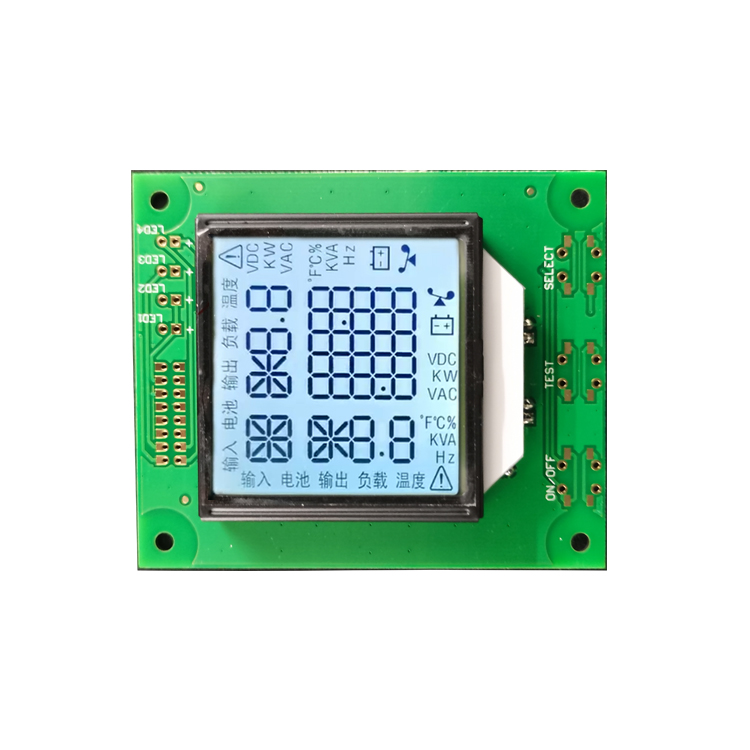
The front glass is not simply a window. It sits slightly recessed behind the bezel so a drop onto a concrete floor hits the frame first. The underside carries an anti-glare coating, which matters more than you would expect in a room full of overhead LED panels.
Connectors were selected for how they feel during service, not just on a datasheet. The primary terminal block uses rising clamps that take a ferrule cleanly, and the auxiliary port has a detent you can feel through the housing. Repeated insertion leaves less fretting dust in the socket than the cheaper alternatives we tried.
Temperature limits are set by the weakest part, which turned out to be the adhesive on the glass gasket, so the rating is conservative. Continuous operation from -10°C to 60°C is safe, and brief dips to -25°C cause no damage as long as the unit is allowed to reach room temperature before power-up. High humidity is tolerated up to 85% at 40°C.
How Contrast, Viewing Angle, and Duty Cycle Change Readability
Contrast rarely behaves the way spec sheets imply. A display might measure 1000:1 on a bench, yet under office lighting the perceived separation between text and background collapses because reflected glare lifts the black level. The eye reads fastest when the luminance gap stays above roughly 10:1 after ambient light is factored in; below that, letters start to blend at the edges and readers squint or lean forward without realizing why.
Viewing angle matters less for a single user seated dead-center, but the moment the panel is tilted or viewed off-axis, the effective contrast drops unevenly. On many LCDs, especially TN-type panels, side angles wash out dark strokes more than light backgrounds, so thin letterforms lose their terminals and become harder to recognize. This is why the same document can feel crisp straight-on and soft when the screen is shared or mounted slightly too high.
Duty cycle affects readability in a less obvious way. With LED backlights using PWM dimming, a short duty cycle at low brightness produces very brief pulses of light separated by longer dark gaps. Some people sense this as flicker; others do not consciously see it, but their eyes still track moving text with more effort. A higher duty cycle or DC-like dimming usually keeps the light on longer within each cycle, which reduces that hidden strain during extended reading.
Prototyping Checks That Catch Design Problems Before Tooling
A quick prototype run tends to uncover the mechanical issues that look perfect on screen. Snap-fit tabs that pass clearance checks in CAD will often catch on a nearby wall during the actual flex arc, because the pivot point is never exactly where the model assumes. Testing that movement in a physical part, before any steel is cut, turns an expensive tooling change into a five-minute CAD adjustment.
The same applies to sink marks around bosses and screw holes. Prototype shots reveal how the resin actually cools in a thick section, which simulation does not always predict once fill speed, gate location and regrind percentage come into play. Adding a small rib, coring out a boss or shifting a gate at this stage is cheap; doing it after tooling means welding, re-machining and delayed samples.
Mating with purchased components is another check that belongs in the prototype phase. Seals need the right groove compression, threaded inserts need enough surrounding plastic to hold torque, and connectors need room to latch without creaking. Running these fits on a rapid prototype or a low-volume mold gives you real tactile feedback, so the final tool goes into production with fewer late-night phone calls.
Lead-Time and Cost Drivers Most Teams Overlook
Most teams treat lead time as a single number handed down from a supplier, but the real delays usually hide in the gaps between handoffs. A part can sit in incoming inspection for three days without anyone noticing, then spend another two days waiting for a quality sign-off because the person who approves the lot works in a different time zone. Those quiet waiting periods rarely show up on a project tracker, yet they stack up faster than the actual manufacturing time. Once teams map the full path from purchase order to production floor, they often find that less than half the total lead time is spent doing actual work.
Cost overruns follow a similar pattern. The obvious expenses get attention, but the overlooked drivers tend to be small, repeated decisions made under pressure. Premium freight on a few missed shipments can erase the savings from months of careful negotiation. Batch size mismatches between assembly and packaging force extra changeovers, idle operators, or duplicate handling. Teams also underestimate the carrying cost of work-in-process inventory when downstream steps are misaligned, as well as the cost of engineering time burned on supplier expediting calls instead of design work. These are not glamorous line items, but they compound.
The fix is usually less about finding a cheaper vendor and more about reducing friction in the flow. Shortening internal approval loops, consolidating incoming inspections, and aligning order quantities with actual usage can cut weeks from a schedule without any capital investment. Likewise, building a buffer for the known unreliable steps rather than spreading it evenly across the whole chain prevents both stockouts and bloated inventory. Teams that pay attention to these hidden drivers stop treating lead time and cost as fixed inputs and start managing them as the result of many small, changeable choices.
Questions Worth Asking Before Locking a Display Specification
Spec sheets have a way of making every panel look respectable, but the conditions that matter are rarely the ones listed at the top. Before locking anything down, it helps to ask where the display will sit, how much ambient light will hit it, and whether users will see it straight on or from an angle. A high brightness figure means little if reflections wash out the image or the coating turns a slight viewing angle into a gray haze. Touch and bezel details also belong in this conversation, because a gorgeous optical stack can be undone by awkward edge swipes or a glossy surface that shows every fingerprint.
It also pays to ask what the display is actually for. If the panel will render skin tones, textiles, or packaging colors, color accuracy and backlight uniformity carry more weight than peak refresh rate. If it will show fast-moving graphics in a vehicle or on a factory floor, response time and motion clarity might matter more than perfect color coverage. It is also worth checking whether the rest of the system can feed the panel properly—bandwidth limits, cable length, and the GPU or processor output can quietly cap a specification that looks fine on paper.
The least glamorous questions often save the most trouble later. Ask about sustained brightness rather than the ten-second maximum, how the panel behaves at the edges of its temperature range, and what kind of drift or image retention shows up after hundreds of hours. Production variation matters too: a hand-tuned sample can easily outperform the units that arrive on the dock. If the display cannot hold its key characteristics across the full operating window and across the production run, the locked specification is just a snapshot rather than a plan.
FAQ
Most people focus on the visible layout and ignore how the display will be driven. The multiplex ratio, operating voltage, and whether the host board can actually supply the needed bias levels matter more than the artwork. If those aren't locked down early, you can end up with a display that looks right on paper but ghosts or flickers in the field.
It comes down to temperature range and how fast the segments need to switch. Standard fluids are fine for room-temperature consumer gear. If the device sits in a vehicle dashboard or outdoors, a wider-temperature fluid prevents slow response and loss of contrast when it gets cold.
Because those choices affect assembly cost and long-term reliability. Zebra strips are cheap and forgiving for prototyping, but they need a bezel that applies even pressure. Soldered pins or FPC give a more rugged connection, especially if the product will see vibration or thermal cycling.
Yes. If you can accept a standard glass thickness and a common viewing area, the factory can often reuse existing tooling for the outline. The largest non-recurring cost usually comes from the segment layout and the mask, so simplifying the number of different segment shapes helps more than shrinking the display size.
A reflective polarizer works well in bright sunlight but disappears in dim light without a backlight. A transflective polarizer handles both but reduces contrast slightly. If the product is used outdoors and indoors, transflective is usually the safer compromise.
Add a backlight when the product will be used in low-light environments or where ambient light can't be controlled. The trade-off is thickness, power consumption, and heat. LED colors and placement also change how even the light looks across the digits.
Ghosting often appears when the bias ratio is set incorrectly for the chosen multiplex rate. A display tuned for 3V operation may show faint unwanted segments if the board drives it at 5V without adjusting the bias. Matching the LCD to the actual drive waveform is more important than just matching the pinout.
Expect at least two rounds. The first samples usually confirm that the layout and connection are correct. Small issues like segment alignment, contrast under real lighting, or pin length show up after assembly, so a second sample round is common before the design is frozen.
Conclusion
A custom segment LCD quotation rarely changes for the reason most buyers assume. The glass outline, number of segments, pin count, and whether the design needs a standard connector or a heat-seal tail often move the price more than the display size alone. Temperature range is another quiet cost lever: a part rated for industrial cold or high heat requires different liquid crystal fluid and seals, so the same visual layout can end up on two very different bills of material. Equally important is readability. Contrast, viewing direction, and duty cycle interact in ways that are easy to miss on a datasheet, and a display that looks fine at 3 volts may wash out under bright light or at an angle.
Before committing to tooling, it is worth building a quick bench prototype with the selected glass, zebra strip or connector, and the actual drive scheme. This catches pinout mistakes, ghosting, uneven contrast, and mechanical fit issues while changes are still inexpensive. Lead times are often extended not by glass production itself but by slow approvals, unclear pin assignments, and late changes to the tail or mounting holes. The most useful questions to ask a manufacturer are not about generic pricing. They are about what has already been proven in production, which temperature range the fluid can handle, what minimum dot pitch the process supports, and which connector style will survive assembly and field use. Locking those details early tends to reduce both cost and the number of surprises that appear after tooling.
Contact Us
Contact Person: Vincent
Email: [email protected]
Tel/WhatsApp: 86 135 5485 1379
Website: https://www.jda-display.com/